laptop recovery issues

Jaskanwar Singh

Aspiring Novelist
i got a hp pavilion g6 2005 ax. it came with windows 7, i upgraded to win 8, then 8.1. i had created windows 7 recovery disks, and windows 8 usb.

now recently i dropped it and its showing this error -
*i.imgur.com/tQnCBBO.jpg

i insert windows 8 usb and get this error -
*i.imgur.com/fHzEFVx.jpg

i use windows 7 recovery then this error -
*i.imgur.com/gYjvcpX.jpg
*i.imgur.com/lUgNrGx.jpg

is the hdd dead?
can i connect it to pc to backup some data?
 

Ascendant001

Super Moderator
Staff member
well if you dropped it then dead hdd is a likely result.try some linux live boot usb or hiren boot usb drive & if it too fails to show hdd then most likely it is dead.recovery depends on extent of damage & that will be known only after taking out the hdd & examine it.
 

bssunilreddy

Chosen of the Omnissiah
If you had made a recovery disk then use it or else you need to make a clean instal of the OS and keep all your drivers with you.
In case there is a backup of your drivers in your laptop then start it up in safe mode and make a copy with your pendrive and then re-install the OS and when it asks for drivers. Voila.OK.

If it is a hardware failure then if its under warranty then RMA the HDD or else buy a new one.

[h=1]Creating Recovery Discs or Saving a Recovery Image to a USB Flash Drive (Windows 7)[/h]Link: *h10025.www1.hp.com/ewfrf/wc/document?cc=us&dlc=en&docname=c01867124&lc=en
 
Last edited:
OP
Jaskanwar Singh

Jaskanwar Singh

Aspiring Novelist
ok so i put the hdd in desktop and it started running. (as secondary)
then i put it back in laptop and its working now.

but i cant see any of windows 8.1 startup apps. blank screen with start on top left, user on top right.
i have set win 8.1 to boot to desktop directly which it does and i can see my data. but i press start button, no apps are shown.
 

bssunilreddy

Chosen of the Omnissiah
ok so i put the hdd in desktop and it started running. (as secondary)
now i put it back in laptop and its working now.

but i cant see any of windows 8 startup apps. blank screen with start on top left, user on top right.

Good at least its working now know. Do a Recovery and you will get all your apps back to the most recent restore point.OK.
 
OP
Jaskanwar Singh

Jaskanwar Singh

Aspiring Novelist
btw, this drop happened 3 weeks ago. then i had tested it in friends laptop, then back in mine and it started working. worked fine for 2 weeks. then it gave that same error, i didn't have much time then because of exams. now today i repeated that process with pc and its started working again. so, what u guys think? this needs to be replaced?
 
OP
Jaskanwar Singh

Jaskanwar Singh

Aspiring Novelist
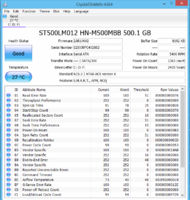
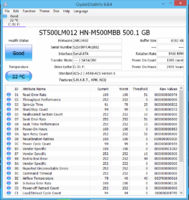
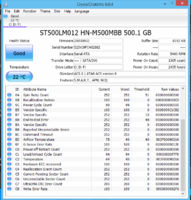
here u go -
Capture.PNG
 

Ascendant001

Super Moderator
Staff member
the screenshot is missing lower values but from whatever i can see it looks fine though recalibration retries & G-sense error rate values indicate the drop.post screenshot showing all values next time by resizing the crystaldiskinfo window.
 

Ascendant001

Super Moderator
Staff member
missed it somehow.everything looks ok.for future reference keep an eye on reallocated sectors count,reallocation event count,current pending sector count & uncorrectable sector count values.these should not increase(in very rare cases it may happen once but never continuously).
 
Top Bottom