
Info Sharing - Putting Airtel GX 2122A in Bridge Mode - FTTH

patkim

Cyborg Agent
This is gen info sharing post.

Last few months I have seen a few posts on this forum where Airtel FTTH users wanted to use their own router in place of one provided by Airtel. Some were fighting with Airtel to set up Bridge mode, some eventually settled for Access Point mode.
The device these days provided by ISPs with their FTTH setup is in fact an ONT with WiFi Router integrated, in general being called as fiber modem or fiber router by everyone. These devices may not be as feature rich as traditional Ethernet WAN port based routers available from brands like TP Link Dlink Asus etc. To use your good quality feature rich Ethernet router ‘full-fledged’ in such a setup ideally is to put ISP’s fiber router in Bridge Mode whereby its routing function gets disabled and it’s more or less like a dumb ONT.

My Airtel Internet at Pune has finally been migrated from Ethernet to FTTH. I received GX Titanium-2122A fiber router. Your FTTH and GPON partner - GX Group | European quality It’s quite unlocked but lacks some very basic features! Here are steps how to put this device in Bridge Mode. I did such setup on a BSNL FTTH connection with their DBC router at my relative’s place but this one was even much much simpler.

Note - These steps are specific to GX 2122A your device may have different make/model and steps may vary

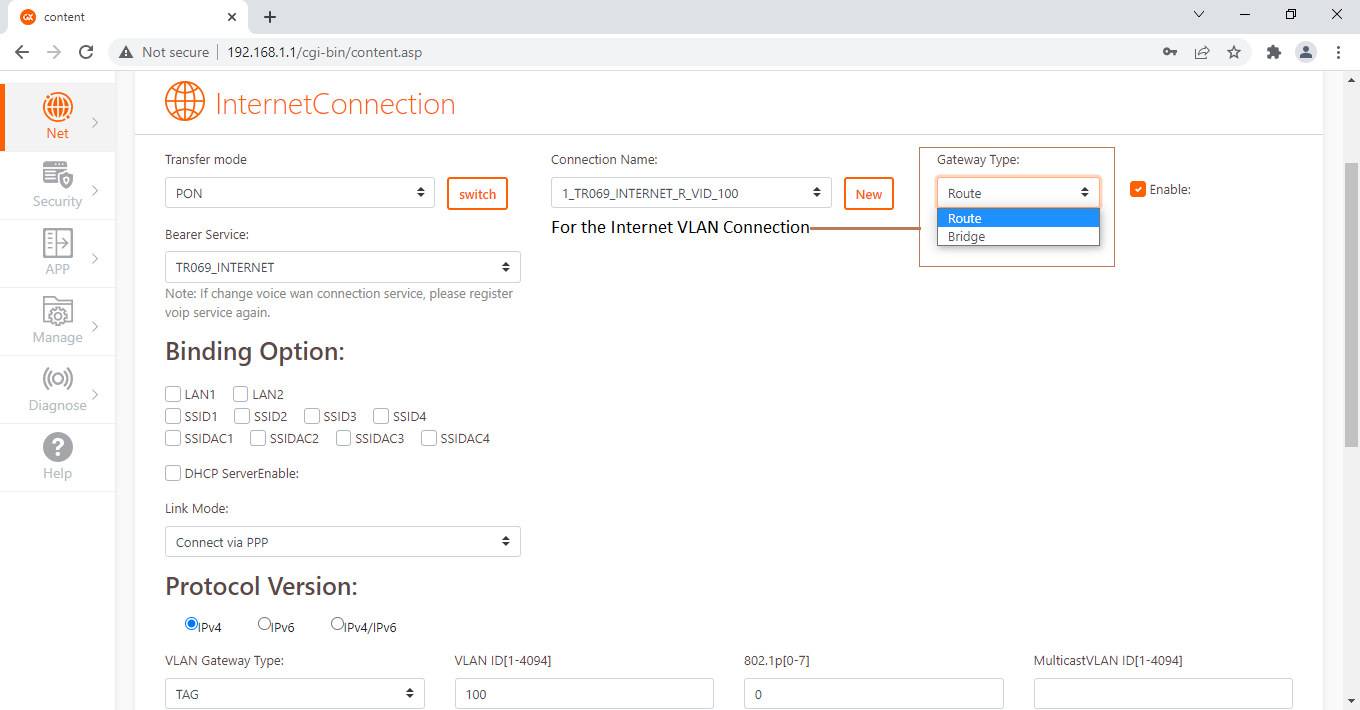
In NET -> WAN Setup you will have 2 connections under Connection_Name, one for Internet & another for Voice. Select your Internet VLAN connection from the drop down. Now the next drop down is Gateway Type – Options are Route (Default) or Bridge.
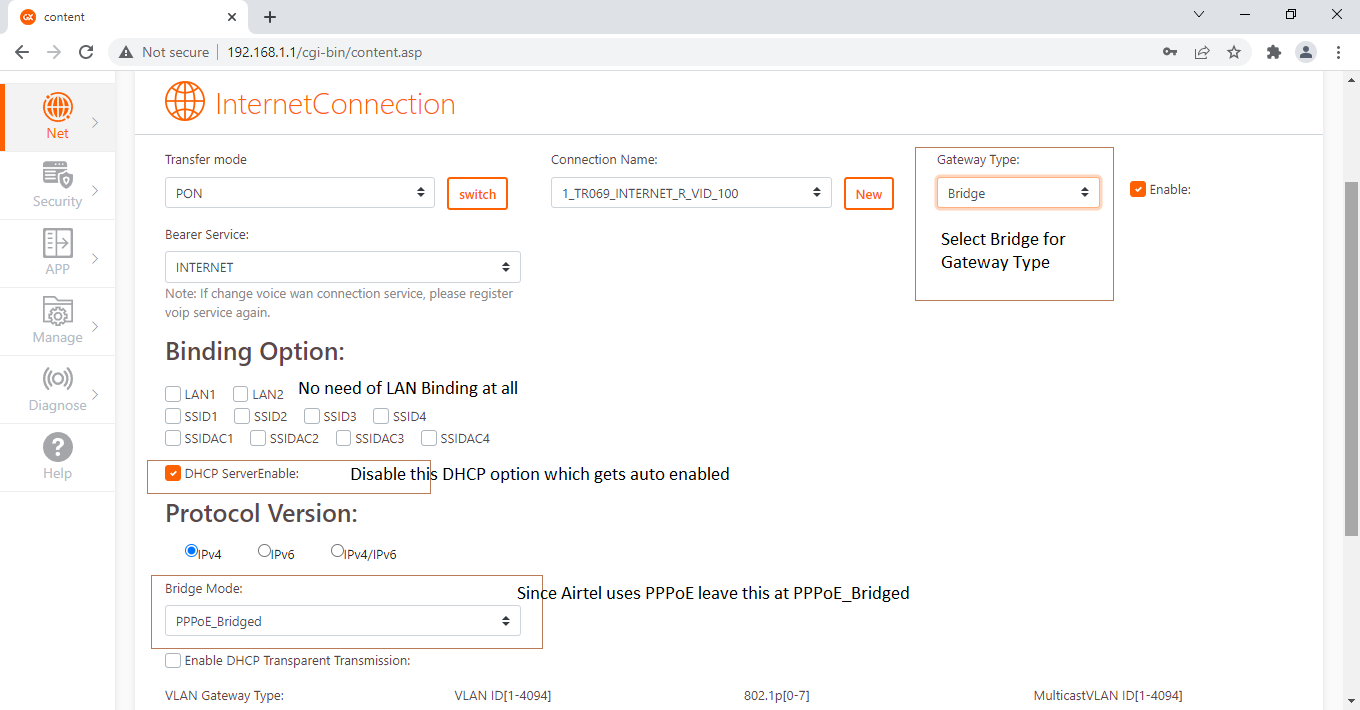
Select Bridge. Now the Bearer_Service auto changes from TR069_Internet to just Internet. That’s normal.

DHCP Server gets enabled automatically. Just uncheck that. Also In dropdown named Bridge Mode below, it will auto select PPPoE_Bridge as default. Leave that as it is because Airtel uses PPPoE.
While BSNL’s DBC router additionally required LAN Port binding, this device did not.
So, apply the changes and reboot the router. That’s it!

Optionally Disable DHCP Server in Net -> LAN options and disable WiFi as they have no role to play. However, if you are not an advanced user, leave DHCP running as it will be easy to connect back to this device later if you wish to, say to revert it back to Routing mode.
Plug a LAN cable from any of the LAN ports of 2122A to WAN port of your ethernet router. Now setup your own ethernet router full-fledged including PPPoE Internet connection, DHCP, WiFi and all advanced WAN dependent features that you may be interested in. Now it’s your own Ethernet router front ending ISP’s Internet WAN. Voice remains unaffected and will continue to be handled by the fiber router.

Without making any alterations in ISP router you can always setup your own router in AP mode, if you just want Internet or extend the range, however then most of the WAN dependent features & some advanced features are lost in your router.
Airtel-1.png


Airtel-2.png
 

senpai8267

Right off the assembly line
Hy I have this same exact router I want to know what's the purpose of the usb port in this router as it's not have any storage or ftp option
 

whitestar_999

Super Moderator
Staff member
Hy I have this same exact router I want to know what's the purpose of the usb port in this router as it's not have any storage or ftp option
Its functionality is hidden/locked behind oem firmware which is Airtel in this case. Router companies usually don't manufacture a separate router for their oem clients & instead just take an existing model as base & disable certain features of it via software as per client's specifications.
 

senpai8267

Right off the assembly line
Its functionality is hidden/locked behind oem firmware which is Airtel in this case. Router companies usually don't manufacture a separate router for their oem clients & instead just take an existing model as base & disable certain features of it via software as per client's specifications.
Thx for the reply dude but do you know where can I find its firmware.
 

whitestar_999

Super Moderator
Staff member
Thx for the reply dude but do you know where can I find its firmware.
You can't, at least not publicly. You need to have some inside source in Airtel who can provide a secret firmware to unlock all functionality assuming the router manufacturing company also provided such secret firmware to Airtel.

P.S. Above is assuming you want a firmware that can unlock hidden features, if you want a typical official firmware update then Airtel should provide at least one version in a few months/year.
 
OP
patkim

patkim

Cyborg Agent
@senpai8267 The main purpose of writing that post on Bridge Mode was to overcome this limitation of ISP provided ONT router. The firmware is locked and it's custom made for an ISP by the vendor. You simply put that ONT in Bridge and virtually replace it with you own good quality feature rich router which does WAN front ending and all router's heavy lifting, so you get want you want.

In fact in my case, I noticed some design issues with that 2122A so I made a lot of noise to the manufacturer GMX (even though it's B2B) and to Airtel and finally I got ZXN brand which is much better than that. I don't have 2122A anymore so won't be able to check out anything on your comment.
 

I_must_b_human

Right off the assembly line
This is gen info sharing post.

Last few months I have seen a few posts on this forum where Airtel FTTH users wanted to use their own router in place of one provided by Airtel. Some were fighting with Airtel to set up Bridge mode, some eventually settled for Access Point mode.
The device these days provided by ISPs with their FTTH setup is in fact an ONT with WiFi Router integrated, in general being called as fiber modem or fiber router by everyone. These devices may not be as feature rich as traditional Ethernet WAN port based routers available from brands like TP Link Dlink Asus etc. To use your good quality feature rich Ethernet router ‘full-fledged’ in such a setup ideally is to put ISP’s fiber router in Bridge Mode whereby its routing function gets disabled and it’s more or less like a dumb ONT.

My Airtel Internet at Pune has finally been migrated from Ethernet to FTTH. I received GX Titanium-2122A fiber router. Your FTTH and GPON partner - GX Group | European quality It’s quite unlocked but lacks some very basic features! Here are steps how to put this device in Bridge Mode. I did such setup on a BSNL FTTH connection with their DBC router at my relative’s place but this one was even much much simpler.

Note - These steps are specific to GX 2122A your device may have different make/model and steps may vary

In NET -> WAN Setup you will have 2 connections under Connection_Name, one for Internet & another for Voice. Select your Internet VLAN connection from the drop down. Now the next drop down is Gateway Type – Options are Route (Default) or Bridge.
Select Bridge. Now the Bearer_Service auto changes from TR069_Internet to just Internet. That’s normal.

DHCP Server gets enabled automatically. Just uncheck that. Also In dropdown named Bridge Mode below, it will auto select PPPoE_Bridge as default. Leave that as it is because Airtel uses PPPoE.
While BSNL’s DBC router additionally required LAN Port binding, this device did not.
So, apply the changes and reboot the router. That’s it!

Optionally Disable DHCP Server in Net -> LAN options and disable WiFi as they have no role to play. However, if you are not an advanced user, leave DHCP running as it will be easy to connect back to this device later if you wish to, say to revert it back to Routing mode.
Plug a LAN cable from any of the LAN ports of 2122A to WAN port of your ethernet router. Now setup your own ethernet router full-fledged including PPPoE Internet connection, DHCP, WiFi and all advanced WAN dependent features that you may be interested in. Now it’s your own Ethernet router front ending ISP’s Internet WAN. Voice remains unaffected and will continue to be handled by the fiber router.

Without making any alterations in ISP router you can always setup your own router in AP mode, if you just want Internet or extend the range, however then most of the WAN dependent features & some advanced features are lost in your router.

View attachment 21352

View attachment 21353
This is gen info sharing post.

Last few months I have seen a few posts on this forum where Airtel FTTH users wanted to use their own router in place of one provided by Airtel. Some were fighting with Airtel to set up Bridge mode, some eventually settled for Access Point mode.
The device these days provided by ISPs with their FTTH setup is in fact an ONT with WiFi Router integrated, in general being called as fiber modem or fiber router by everyone. These devices may not be as feature rich as traditional Ethernet WAN port based routers available from brands like TP Link Dlink Asus etc. To use your good quality feature rich Ethernet router ‘full-fledged’ in such a setup ideally is to put ISP’s fiber router in Bridge Mode whereby its routing function gets disabled and it’s more or less like a dumb ONT.

My Airtel Internet at Pune has finally been migrated from Ethernet to FTTH. I received GX Titanium-2122A fiber router. Your FTTH and GPON partner - GX Group | European quality It’s quite unlocked but lacks some very basic features! Here are steps how to put this device in Bridge Mode. I did such setup on a BSNL FTTH connection with their DBC router at my relative’s place but this one was even much much simpler.

Note - These steps are specific to GX 2122A your device may have different make/model and steps may vary

In NET -> WAN Setup you will have 2 connections under Connection_Name, one for Internet & another for Voice. Select your Internet VLAN connection from the drop down. Now the next drop down is Gateway Type – Options are Route (Default) or Bridge.
Select Bridge. Now the Bearer_Service auto changes from TR069_Internet to just Internet. That’s normal.

DHCP Server gets enabled automatically. Just uncheck that. Also In dropdown named Bridge Mode below, it will auto select PPPoE_Bridge as default. Leave that as it is because Airtel uses PPPoE.
While BSNL’s DBC router additionally required LAN Port binding, this device did not.
So, apply the changes and reboot the router. That’s it!

Optionally Disable DHCP Server in Net -> LAN options and disable WiFi as they have no role to play. However, if you are not an advanced user, leave DHCP running as it will be easy to connect back to this device later if you wish to, say to revert it back to Routing mode.
Plug a LAN cable from any of the LAN ports of 2122A to WAN port of your ethernet router. Now setup your own ethernet router full-fledged including PPPoE Internet connection, DHCP, WiFi and all advanced WAN dependent features that you may be interested in. Now it’s your own Ethernet router front ending ISP’s Internet WAN. Voice remains unaffected and will continue to be handled by the fiber router.

Without making any alterations in ISP router you can always setup your own router in AP mode, if you just want Internet or extend the range, however then most of the WAN dependent features & some advanced features are lost in your router.

View attachment 21352

View attachment 21353

Hi there...
Please could I request an update on this absolutely brillient article that has helped me for a long while. I realise you have changed your modem - but assume you are still using Airtel ? Bridge mode is no longer working on Airtel for me - and the tech team at Airtel say this is because this is an IP in the 100 series and not a public IP. This is a dynamic NAT IP behind CGNAT. I am not very technical on this and hope this makes sense.. but I somehow a bit stumped that I can no longer access my systems and devices whilst I am outside my LAN. Please could you throw some light on this and perhaps even some detailed screen shots as above that would help. The tech guy at Airtel suggests only option is to go for a static IP... which I am trying to avoid due to the additional risks that can carry
 

Desmond

Destroy Erase Improve
Staff member
Admin
You are replying to a four year old thread. The conversation is probably out of context. I suggest creating a new thread and ask your question there.
 
OP
patkim

patkim

Cyborg Agent
I not only changed my ONT I also changed my ISP!!!

Airtel ONT Routers were not much locked, up until a few years ago, but the newer models and its firmware has locked most of the settings including Bridge Mode.

Bridge Mode has nothing to do with Public or Private IP. It’s a separate process. To get your Airtel provided ONT Router in Bridge you have to make a noise to net@airtel.com net at the rate airtel dot com email id. (No one else in Airtel will even entertain you on this)That’s the backend customer experience team.

They will (after a few follow ups from your side and insistence) pass on the request to backend NOC team and that team will enable Bridge Mode on one of the LAN ports of your Airtel provided ONT Router. This is managed and controlled from the backend. Then use your own Ethernet based router to front end ISP WAN.
However if you get Private IP (CGNAT) then Bridge Mode will not directly help. Even if you get Bridge Mode and use your own router, it will still get CGNAT Private IP. To overcome that you need to go for static public IPv4 for an additional cost.

Alternatively if the destination is a Windows or Linux PC then you can explore SoftEther VPN (free) setup which requires a bit of an understanding and use UDP Hole punching or VPN Azure redirect technique to still access your system behind CGNAT, or with SoftEther setup simply use IPv6 if offered by Airtel.
 
Top Bottom