Realtek Audio Hd WIndows 10 glitch

pkkumarcool

Game & anime Lover
Its happening for me too when i plug in my headphone in 3.5mm jack reatek hd notification comes headphone plugged but sound doesnt come in headphone i think it is a glitch needs to be fixed latest realtek hd manager with windows 10.I have to restart my pc to make it work.I unistalled realtek hd audio and used default sound mangar it works but after sometime it automatically installs realtek and makes it default sound manager
 

whitestar_999

Super Moderator
Staff member
Let me guess,you are using win 10 home which has no usual way of disabling automatic driver updates(one major reason why I never suggest anyone to use win 10 home,at least use pro especially if you can get it for free by following a "trick").

Use this in the meantime though,can control all windows updates(use the 64bit file if running 64bit win 10):
wumt.zip
 

bssunilreddy

Chosen of the Omnissiah
For me when I plug in my head phone sound does not come or if it is already plugged in also. So I remove and plug in again to get the sound in my headphones.
It is coming after I updated to 1809 only not before that. I think either Microsoft or Realtek needs to patch it with an update.
 

ithehappy

Human Spambot
Yeah I have this exact same problem since December, when I formatted and freshly installed Windows 10 (Pro). After installation I download and install everything from Asus's site (audio driver, chipset and all those), but this problem came from nowhere. I also don't think the Realtek HD audio manager's version has anything to do with it. As the problem occurs on Asus's released version of Realtek and also it happens if you let MS to update the Realtek audio manager! It's a ridiculous problem and has been driving me bonkers for this past three months! Never I have faced this problem before, but only after the fresh installation around December. It's that bloody Windows 10 update, where they have included those Spatial Sound (Sonic sound and all those) under audio section, started to cause this problem!

Should I just format now again? Install Windows 10 fresh? And also post-installation should I install all the drivers from Asus's site or let MS download everything?

This is ridiculous! Even after like two years or more Windows 10 is still a BIG ARSE MESS.

 

whitestar_999

Super Moderator
Staff member
Why this multiple formatting,always create a system image(use macrium reflect free) of previous win 10 version & if after format & fresh install you don't like/found issues with new version then simply restore the previous version from image(good for experimenting too without the hassle of format & fresh install everything every time).Pro version can delay semi-annual update to a year(aka 2 versions) so hope that by that time this issue is resolved.
 

ithehappy

Human Spambot
Why this multiple formatting,always create a system image(use macrium reflect free) of previous win 10 version & if after format & fresh install you don't like/found issues with new version then simply restore the previous version from image(good for experimenting too without the hassle of format & fresh install everything every time).Pro version can delay semi-annual update to a year(aka 2 versions) so hope that by that time this issue is resolved.
Huh? I don't format mate. Last time I formatted was in 2016, but then I started to have problems like slow boot etc., tried everything, in the end simply formatted it.

Please tell me how to delay the updates, and whether post-installation I should be using drivers from manufacturer's website (Asus) or let MS download and install them?
 

whitestar_999

Super Moderator
Staff member
I am using the same windows 7 install for last 7.5 years. Image is good for experimenting,make a system image,experiment with update/drivers/format fresh install etc & then restore from image to go back to original system state.

Windows Update MiniTool you need to register to view the links(do it anyway as it is the best windows tweaks related site(plus the original source of all MS "ahem" solutions),the well known DAZ of "ahem" loader is one of its mod).

upload_2019-2-19_18-29-14.png


Try Asus drivers first & if they don't work then try latest MS drivers.If none of them work then simply install the previous win 10 version & use the above option to delay feture updates by 365 days.Use WUMT to control usual windows updates.
 

ithehappy

Human Spambot
Lol. I formatted yesterday and installed Windows 10 Pro fresh. And this time I did NOT install a single driver from Asus's website, just let MS download all the stuffs post installation, and still the problem persists! I am out of options now. Previously the problem remained with Asus's version of Realtek drivers and now its the same with MS's version of Realtek! I am giving up more or less. Only if OP had come back and said whether he found a solution or not!
 

bssunilreddy

Chosen of the Omnissiah
Lol. I formatted yesterday and installed Windows 10 Pro fresh. And this time I did NOT install a single driver from Asus's website, just let MS download all the stuffs post installation, and still the problem persists! I am out of options now. Previously the problem remained with Asus's version of Realtek drivers and now its the same with MS's version of Realtek! I am giving up more or less. Only if OP had come back and said whether he found a solution or not!
Dude, before I used to get no sound or wave type sound when I plug my USB headphones into my MSI Laptop but now after updating to Realtek Drivers Version 6.0.1.8544 It solved the no output and crackling outup also from my headphones.
I downloaded the latest drivers from an upscaled model of MSI laptop. While mine is MSI GL627REX I downloaded Realtek drivers from MSI GL638SE Model.
 

ithehappy

Human Spambot
Dude, before I used to get no sound or wave type sound when I plug my USB headphones into my MSI Laptop but now after updating to Realtek Drivers Version 6.0.1.8544 It solved the no output and crackling outup also from my headphones.
I downloaded the latest drivers from an upscaled model of MSI laptop. While mine is MSI GL627REX I downloaded Realtek drivers from MSI GL638SE Model.
Bruh where did you download it from? I tried checking in Realtek's website, but I don't even understand whether any audio driver is posted there or not! Weird looking site. Could you please link me from where you downloaded the latest driver? I checked their official site, Downloads - REALTEK
 

whitestar_999

Super Moderator
Staff member
^^It is.

He downloaded audio driver from costlier/newer laptop model(from msi site) as audio hardware is usually same between various models of a laptop series & many times an updated driver for a newer laptop model also works with older/lower models of same series.
 

ithehappy

Human Spambot
^^It is.

He downloaded audio driver from costlier/newer laptop model(from msi site) as audio hardware is usually same between various models of a laptop series & many times an updated driver for a newer laptop model also works with older/lower models of same series.
Oops. completely missed that part about him downloading from manufacturer's website, shite. Now checking Asus site for those really updated motherboards like Z370 series and all to download one from their only, LMAO.
 

whitestar_999

Super Moderator
Staff member
You can even check msi & gigabyte sites,there was actually a beta version of intel graphics driver for 7th gen released by asus that worked with win 8.1 so many people who wanted to run win 8.1 on 7th gen used that beta driver even if their mobos were from different manufacturer.
 

ithehappy

Human Spambot
You can even check msi & gigabyte sites,there was actually a beta version of intel graphics driver for 7th gen released by asus that worked with win 8.1 so many people who wanted to run win 8.1 on 7th gen used that beta driver even if their mobos were from different manufacturer.
Oh god. OK, will remember that.

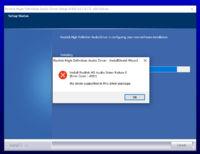
Just tried to install from a Strix Z370 board, and of course I have to see some error! Oof. This trial and error testing is really boring.
 

Attachments

  • OK.PNG
    OK.PNG
    73.3 KB · Views: 230

whitestar_999

Super Moderator
Staff member
Check your realtek audio codec.e.gALC887 is the most common realtek audio chip so try only mobos with ALC887 mentioned as audio in their specs on manufacturer's website.
 

ithehappy

Human Spambot
Check your realtek audio codec.e.gALC887 is the most common realtek audio chip so try only mobos with ALC887 mentioned as audio in their specs on manufacturer's website.
Sir, sorry for asking this stupendous thing, where to check the audio coded for my board? I checked the spec page of Z170 Pro Gaming, nothing mentioned there.

PS: Wait, under Realtek HD Audio Manager About section its mentioned as ALC1150.
 
Last edited:

whitestar_999

Super Moderator
Staff member
upload_2019-2-22_13-46-39.png

SupremeFX is just realtek audio codec with few software tweaks.
As per this thread:
Audio codecs: Realtek ALC892 vs. Realtek ALC1150 (vs. SupremeFX?) - Forums - PCPartPicker
The ASUS Z170-A for example, has the ALC892. It being a Z170 board that is perhaps more premium you'd expect it to have the ALC1150 surely haha!?
 

bssunilreddy

Chosen of the Omnissiah
Bruh where did you download it from? I tried checking in Realtek's website, but I don't even understand whether any audio driver is posted there or not! Weird looking site. Could you please link me from where you downloaded the latest driver? I checked their official site, Downloads - REALTEK
I again downloaded the latest Realtek HD Audio Driver 6.0.1.8639 WHQL from here:[DRIVERS] Realtek High Definition Audio Codecs (HDA/UAD)
Use the one named as Generic or as per your OEM.
 

ithehappy

Human Spambot
I again downloaded the latest Realtek HD Audio Driver 6.0.1.8639 WHQL from here:[DRIVERS] Realtek High Definition Audio Codecs (HDA/UAD)
Use the one named as Generic or as per your OEM.
Ha ha something is very wrong with my system it seems bruh! I am trying to install the same drivers (the Generic one) from your link, but upon clicking on it it says its a two step process and first uninstall the existing drivers, then a reboot, but after that reboot it keeps uninstalling the existing drivers again, so it never actually installs the new drivers!

Could this be because I have not installed the chipset drivers or other stuffs from Asus website after fresh windows 10 installation or what?
 
Top Bottom